Monday, August 27, 2012

"Ferb" Latin encoder :) [In .NET/C#]

In the previous post, I had mentioned about the "Pig" latin, which offers some sort of "Perceived" privacy. This morning when I was watching Phineas and Ferb, they invent a new language called "Ferb" latin, so I thought since very less people know about that, we can very well use those rules instead. Here is the program to encode:


public static string GetFerbLatinFromText(string strText)
{
    string strRetVal = string.Empty;
    int i, j;
    try
    {

        StringBuilder sb = new StringBuilder();
        char[] chrLetters;
        string[] strWord = strText.Split(' ', '\n');

        for (i = 0; i < strWord.Length; i++)
        {
            chrLetters = strWord[i].ToCharArray();
            if (chrLetters.Length > 2)
            {

                for (j = 1; j < chrLetters.Length; j++)
                {
                    sb.Append(Char.ToLower(chrLetters[j]));
                }

                sb.Append(Char.ToLower(chrLetters[0]));
                sb.Append("erb ");

            }
            else
            {
                sb.Append(strWord[i]);
                sb.Append(" ");
            }
        }

        strRetVal = sb.ToString();
    }
    catch (Exception exp)
    {
        throw exp;
    }

    return strRetVal;
}


Code to decode the text :

public static string GetTextFromFerbLatin(string strText)
{
    string strRetVal = string.Empty;
    int i, j;
    try
    {
        StringBuilder sb = new StringBuilder();
        char[] chrLetters;
        string[] strWord = strText.Split(' ', '\n');

        for (i = 0; i < strWord.Length; i++)
        {
            chrLetters = strWord[i].ToCharArray();
            if (chrLetters.Length > 2)
            {

                if(chrLetters.Length >4)
                    sb.Append(Char.ToLower(chrLetters[chrLetters.Length - 4]));

                for (j = 0; j < chrLetters.Length-4; j++)
                {
                    sb.Append(Char.ToLower(chrLetters[j]));
                }

                sb.Append(' ');

            }
            else
            {
                sb.Append(strWord[i]);
                sb.Append(" ");
            }
        }

        strRetVal = sb.ToString();
    }
    catch (Exception exp)
    {
        throw exp;
    }

    return strRetVal;
}


Source code for this program can be downloaded from here : Link

Executable can be found here : Link 

.NET (C#) based PigLatin generator

Hi All,

I was watching a tv show this morning about piglatin, so I thought I will write this during my coffee break. Enjoy. This is not a complete implementation, well don't expect too much for a coffee break project. :)


  public static string GetPigLatinFromText(string strText)
        {
            string strRetVal = string.Empty;
            int i,j;
            try
            {
                 
                StringBuilder sb = new StringBuilder();
                char[] chrLetters ;
                string[] strWord = strText.Split(' ', '\n');

                for ( i= 0; i < strWord.Length; i++)
                {
                    chrLetters = strWord[i].ToCharArray();
                    if (chrLetters.Length > 2)
                    {
                        if (chrLetters[0] == 'a' || chrLetters[0] == 'e' || 
                            chrLetters[0] == 'i' || chrLetters[0] == 'o' || 
                            chrLetters[0] == 'u' ||
                            chrLetters[0] == 'A' || chrLetters[0] == 'E' || 
                            chrLetters[0] == 'I' || chrLetters[0] == 'O' || 
                            chrLetters[0] == 'U')
                        {
                            //Starts with a vowel
                            sb.Append(strWord[i]);
                            sb.Append("ay ");


                        }
                        else if (chrLetters[0] == 'g' || chrLetters[0] == 'G')
                        {

                            for (j = 1; j < chrLetters.Length; j++)
                            {
                                sb.Append(Char.ToLower(chrLetters[j]));
                            }

                            sb.Append('g');
                            sb.Append("way ");
                        }
                        else
                        {
                            for (j = 1; j < chrLetters.Length; j++)
                            {
                                sb.Append(Char.ToLower(chrLetters[j]));
                            }

                            sb.Append(Char.ToLower(chrLetters[0]));
                            sb.Append("ay ");

                        }

                    }
                    else
                    {
                        sb.Append(strWord[i]);
                        sb.Append(" ");
                    }
                }

                strRetVal = sb.ToString();
            }
            catch (Exception exp)
            {
                throw exp;
            }

            return strRetVal;
        }

Tuesday, August 21, 2012

Using Graphviz library in .NET


GraphViz is a cool & powerful open source graphics library. In my case it might have just saved a large amount of effort, if we were to build it from scratch. So, I thought I will share the approach we followed in our project, so that it can help others..,

Installing GraphViz:

  • Download the Windows MSI file for windows from http://www.graphviz.org/Download.php
  • Backup the Path variable contents (Note: As a rule of thumb you should be doing this each time when you install a new software and the install could mess up your system variables)
  • After installing the tool, you might have to log-off and log in for the path variable change to kick in (or reboot)

Add the GraphViz interface class to your solution:

I found this class somewhere in the internet, (I forgot where I got from), and I have added few methods to make it work for my requirement.

Class:
     public static class Graphviz {
        public const string LIB_GVC = "gvc.dll";
        public const string LIB_GRAPH = "graph.dll";
        public const int SUCCESS = 0;

        ///
        /// Creates a new Graphviz context.
        ///

        [DllImport(LIB_GVC)]
        public static extern IntPtr gvContext();

        ///
        /// Releases a context's resources.
        ///
        [DllImport(LIB_GVC)]
        public static extern int gvFreeContext(IntPtr gvc);

        ///
        /// Reads a graph from a string.
        ///
        [DllImport(LIB_GRAPH)]
        public static extern IntPtr agmemread(string data);

        ///
        /// Releases the resources used by a graph.
        ///
        [DllImport(LIB_GRAPH)]
        public static extern void agclose(IntPtr g);

        ///
        /// Applies a layout to a graph using the given engine.
        ///
        [DllImport(LIB_GVC)]
        public static extern int gvLayout(IntPtr gvc, IntPtr g, string engine);

        ///
        /// Releases the resources used by a layout.
        ///
        [DllImport(LIB_GVC)]
        public static extern int gvFreeLayout(IntPtr gvc, IntPtr g);

        ///
        /// Renders a graph to a file.
        ///
        [DllImport(LIB_GVC)]
        public static extern int gvRenderFilename(IntPtr gvc, IntPtr g,
              string format, string fileName);

        ///
        /// Renders a graph in memory.
        ///
        [DllImport(LIB_GVC)]
        public static extern int gvRenderData(IntPtr gvc, IntPtr g,
              string format, out IntPtr result, out int length);

        public static Image RenderImage(string source, string layout, string format) {
              // Create a Graphviz context
              IntPtr gvc = gvContext();
              if (gvc == IntPtr.Zero)
                    throw new Exception("Failed to create Graphviz context.");

              // Load the DOT data into a graph
              IntPtr g = agmemread(source);
              if (g == IntPtr.Zero)
                    throw new Exception("Failed to create graph from source. Check for syntax errors.");

              // Apply a layout
              if (gvLayout(gvc, g, layout) != SUCCESS)
                    throw new Exception("Layout failed.");

              IntPtr result;
              int length;

              // Render the graph
              if (gvRenderData(gvc, g, format, out result, out length) != SUCCESS)
                    throw new Exception("Render failed.");

              // Create an array to hold the rendered graph
              byte[] bytes = new byte[length];

              // Copy the image from the IntPtr
              Marshal.Copy(result, bytes, 0, length);

              // Free up the resources
              gvFreeLayout(gvc, g);
              agclose(g);
              gvFreeContext(gvc);

              using (MemoryStream stream = new MemoryStream(bytes)) {
                    return Image.FromStream(stream);
              }
        }
  }


Code to write to file:

  try
        {
            //Convert to byte stream
            Byte[] image = Graphviz.RenderImage(graphVizString, "dot", "png");

            currentGUIDo = Guid.NewGuid().ToString();
            strCurrentFileName = ConfigurationManager.AppSettings["ImagePath"].ToString() + currentGUIDo +".png";
            FileStream file = new FileStream(strCurrentFileName, FileMode.Create);
            //Write the image to the file
            file.Write(image, 0, image.Length);
            //close the file
            file.Close();
        }
        catch (Exception ex)
       {
            //TODO:Impelement exception handling
           }


Finally, I had a button where this will be called , and just transmit the file:

if (File.Exists(strCurrentFileName))
           {
               Response.TransmitFile(strCurrentFileName);
           }


Sample values you could use for graphVizString:

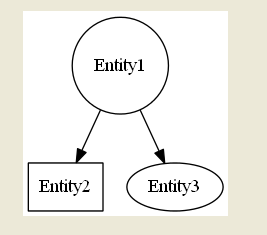
Sample 1:
digraph {
 Entity1 -> Entity2, Entity1 -> Entity3

Entity1 [shape="circle"] , Entity2 [shape="rectangle"]
}


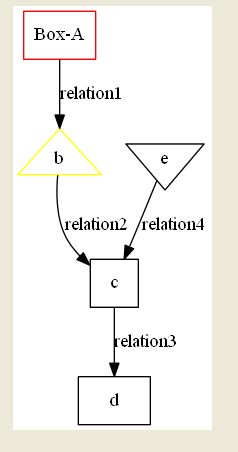
Sample 2:
digraph {
   a -> b [label=relation1],b->c[label=relation2],c->d[label=relation3],e->c [label=relation4]

a [shape=box,color=red,label="Box-A"], b[shape=triangle,color=yellow],e [shape=invtriangle],c [shape=square],d[shape=rectangle]
}

Produces an output:


Sample 3:

digraph {
   a -> b [label=relation1],b->c[label=relation2],c->d[label=relation3],e->c [label=relation4], e->d [label=relation5]

a [shape=box,color=red,label="Box-A"],
b [shape=triangle,color=yellow, label="Triangle-B"],
e [shape=invtriangle, label="Inverse Triangle-C"],
c [shape=square,label="Square - C"],
d [shape=rectangle,label="Rectangle - D"]
}

Tuesday, August 14, 2012

Strange SQL Query Behavior

I faced a strange issue today:

Consider this query in a Stored Procedure:

Select a,b,c from Table1 where (a=@a) or (@a is null)

It is supposed to return all the rows in Table1 when @a is null right? Well, it didn't. I went crazy for a moment there and realized the variable name "@a" is same as the column name, "a" (in this case), so I thought it is getting messed up in the optimizer. 

I renamed the variable @a as @vc_a, and it solved the problem.

So, here is my new quote (well, sort of new..) SQL Server works in mysterious ways.

Thursday, August 9, 2012

ERROR - An attempt was made to load a program with an incorrect format. (Exception from HRESULT: 0x8007000B) An attempt was made to load a program with an incorrect format. (Exception from HRESULT: 0x8007000B)

Hmm... I've been getting this crazy error :


 ERROR - An attempt was made to load a program with an incorrect format. (Exception from HRESULT: 0x8007000B)
An attempt was made to load a program with an incorrect format. (Exception from HRESULT: 0x8007000B)

This error was driving me nuts. The .NET code works perfectly in local, but when I deployed it in the server, it is throwing this error. I realized it was because of a setting in the IIS app pool. 

Enable 32-Bit Applications.  set that property to "True" and that would take care of that issue.


For some reason, Microsoft has decided to disable this setting by default. When you load the 32-bit libraries like, GraphViz, or any other third party VC++ MFC library dll's, an error would be raised as most likely all those DLL's would've been compiled for 32 bit runtime. This typically happens when you build your stuff on a 32-bit platform or using a 32-bit external DLL's and deploy it to a x64 platform, like Windows 2008 R2 server. 

Wednesday, August 1, 2012

Loop through each row in a table using "For Each" loop in SSIS

Hi All,

Recently I had to teach someone to run a For..Each container for all the records in a table, for a specific requirement we had at my work. I have documented the whole process so that you can understand that too, if you haven’t done that before. Kindly read through the entire blog and leave your responses or other suggestions in the comments section.

Note:  Before we begin, let me just make a small recommendation.. All heavy computing and heavy lifting should be done on the DB side.

Uses of this are limitless. In this instance, I am sending emails based on the data in the table, like Word's Mail merge feature.


Let us start with creating the table and inserting few rows into it..

Create table TestTable
(UserID Varchar(200) null,
email Varchar(200) null)


Insert into TestTable(UserID,email) values
('Dinesh','example@example.com')

Step 1.
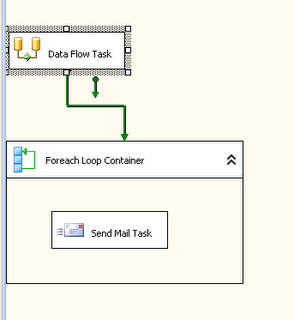
Start Visual Studio, create a new SSIS project add a blank SSIS package add the following to the package:
1. A data flow task
2. A for..each container
3. Within that for..each container, add a send mail task.


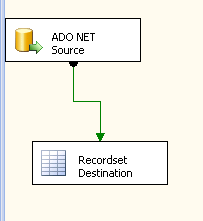
Step 2. Edit the Data Flow task , Add a "ADO .NET source" and "Recordset Destination"


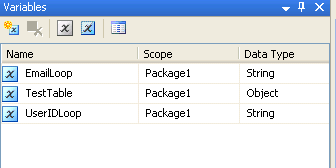
Step 3: Create the following variables in the context of Package (Global variable) EmailLoop - Type String, TestTable - Type Object, UserIDLoop - Type String.


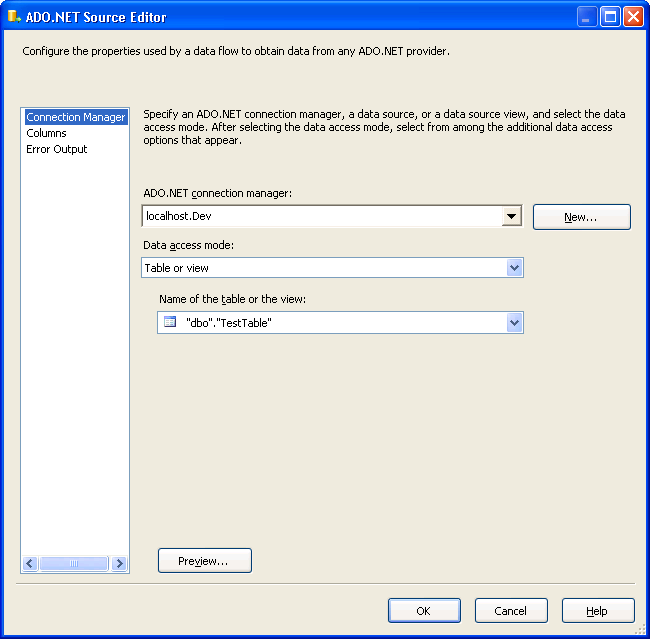
Step 4: Set the properties of the ADO.NET source (I am assuming you will have some background on SSIS, so skipping the details), Select the ADO.NET connection, Data accessmode: Table or view, Name of the table or view : TestTable


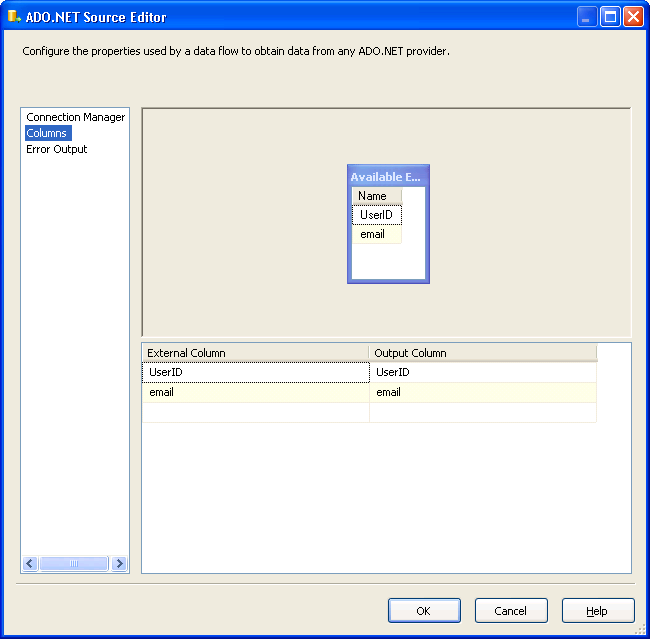
Step 5: Select both the UserID and the email as output in the column selection


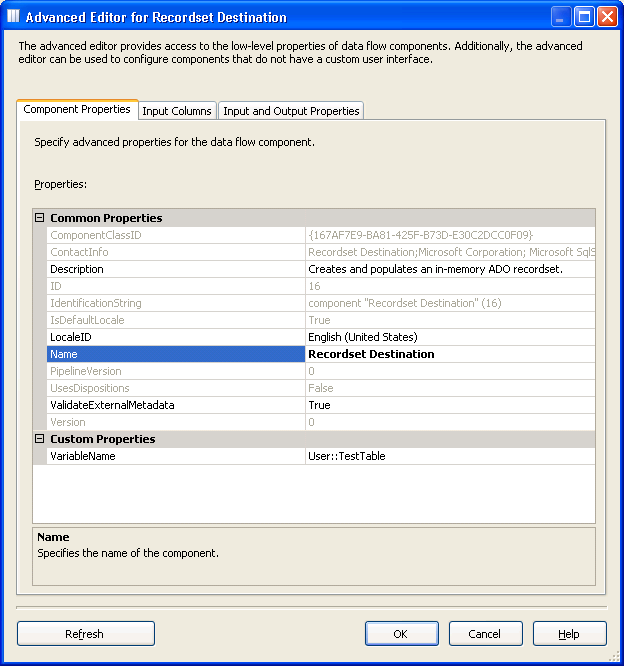
Step 6: Select the properties for RecordSet Destination.  Click on the variable name, and select  “TestTable” (This “TestTable” variable should be of “object” data type, otherwise you will get an error) .

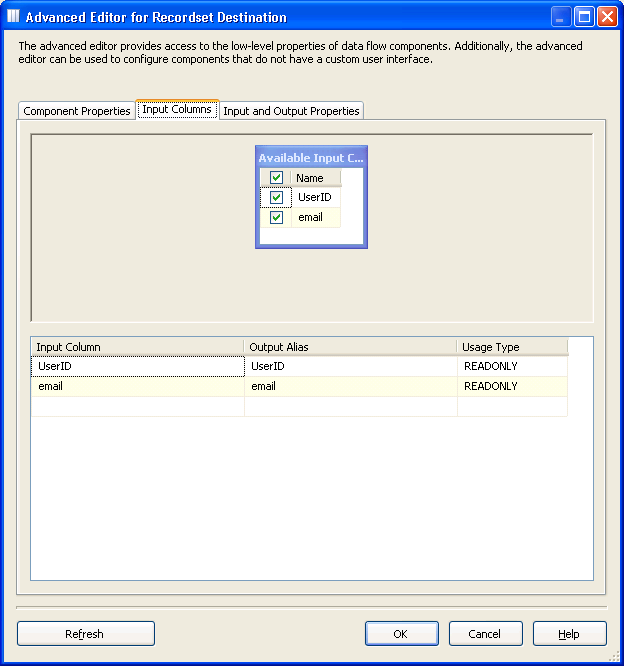
Step 7: Click on the “Input Columns” and add both the columns.


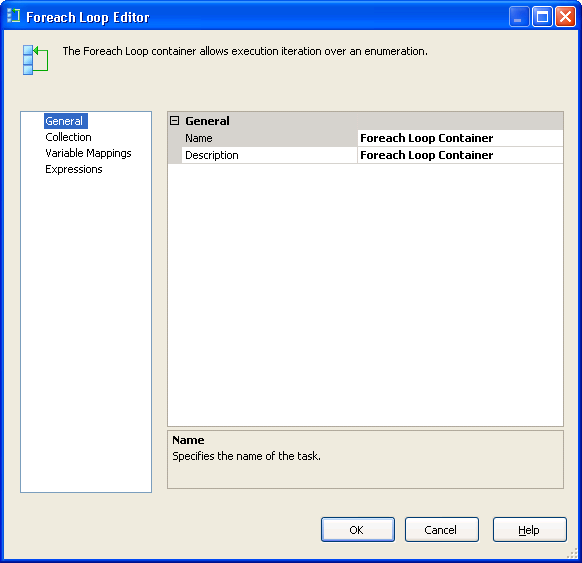
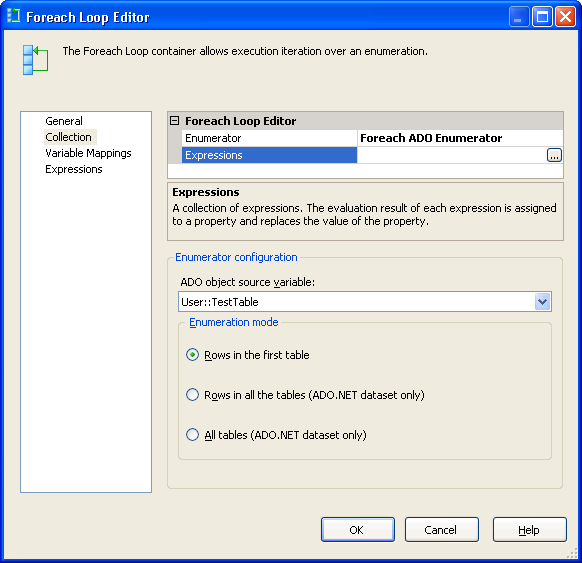
Step 8: Now edit the For...Each container Task, and the properties as follows in the collection tab - Enumerator : Foreach ADO Enumerator, ADO Object source variable : User::TestTable. 


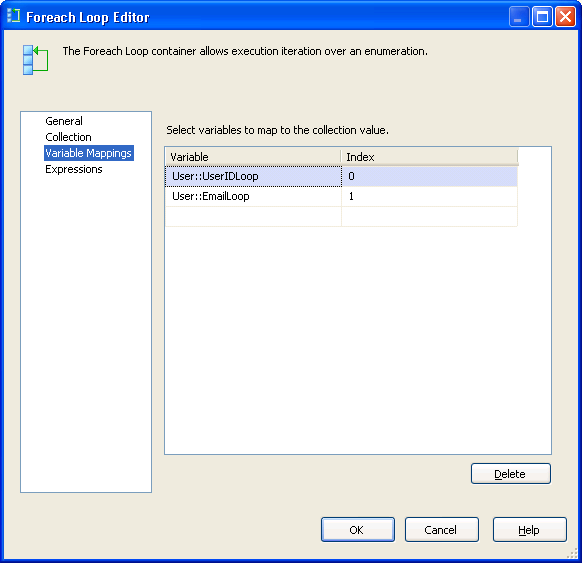
Step 9 : In the variable mappings tab, Select the variable you’ve added for UserID and email in there..


Step 10 : Edit the email task

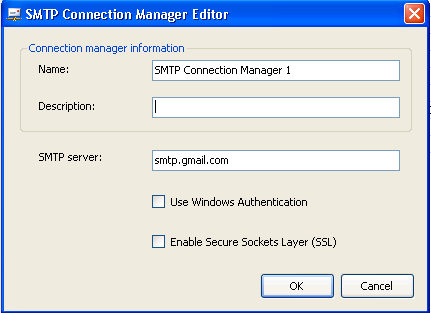
In the SMTPConnection property, select and give the SMTP connection details


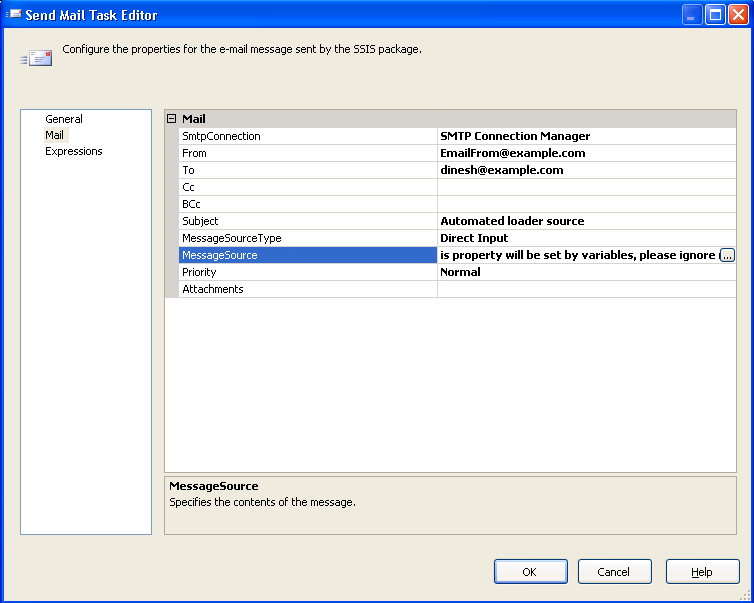
Step 11: In the Mail tab, set the appropriate properties..


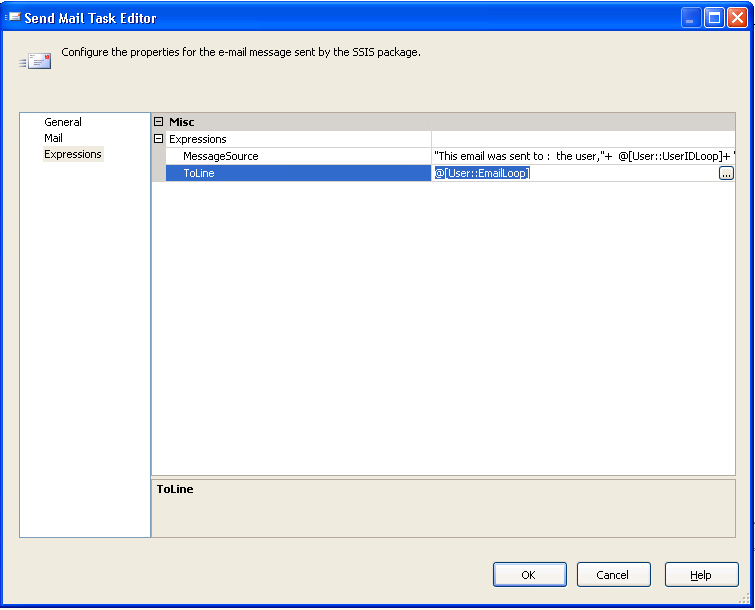
Step 12 : In the expressions tab, set the following values:
MessageSource - "This email was sent to :  the user,"+  @[User::UserIDLoop]+ " with the email " + @[User::EmailLoop]
To Line - @[User::EmailLoop]


Now, we are ready to test it.. Insert few rows in to the “TestTable” in the SQL server, and you have just created your simple mail merge program.

If you have any questions or comments, kindly reach me through the comments section.